Use case · Studios
Client batches, run like a production line.
When a client sends twenty recordings a week, the work is the same treatment applied many times, plus a few exceptions. Reelfold runs a small pilot first, then the whole batch in parallel, and sends you only what its checks flag.
macOS app coming soon · MIT licensed · works today as a Claude Code skill
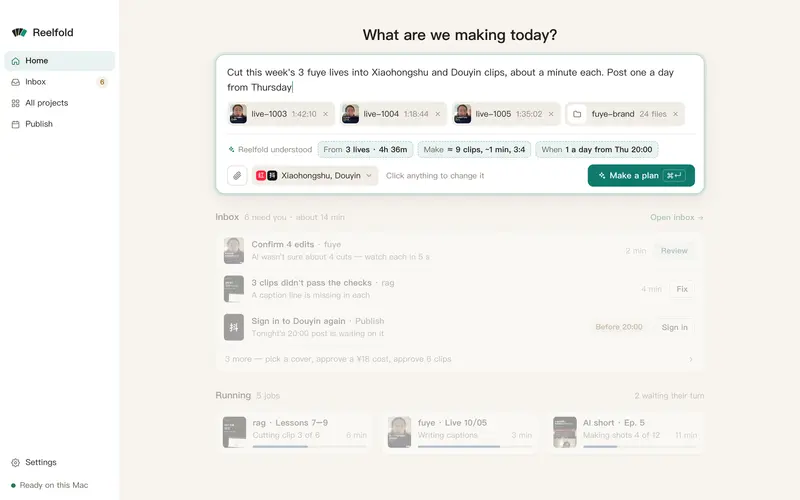
What a studio needs
A workspace per client
Style, platforms, glossary, filler rules and brand colours apply only to that client’s batches.
Pilot before the batch
A few clips run end to end first, so one mistake doesn’t repeat across a hundred jobs.
Exception-only review
Automatic checks for loudness, sync, missing caption words, text under app buttons, length and title length. Only red items reach you.
A delivery package
One folder per platform, a schedule, post copy and a manifest with checksums, ready to hand over.
A week for one client
Import the recordings
Drop a folder. Each file is planned with the client’s settings.
Run the pilot
Check two or three clips. Fix the plan once, for every job after.
Run the batch
Jobs run in parallel, and an interrupted run picks up where it stopped.
Deliver
Review the flagged few, then hand over the folders or fill each upload page yourself.
Questions
Questions, answered plainly.
Is there a per-seat or per-minute fee?
No. Reelfold is free and MIT licensed. You pay only for the AI you connect: the 72-minute batch on our home page cost $0.73.
Can my client publish themselves?
Yes. The delivery folder has the videos, covers, copy and a schedule. The publishing checklist reminds them to tick each platform’s AI label.
Can I script it?
Yes. The engine underneath is open source and runs from the command line or as a Claude Code skill.
Related
Run your next client batch on your Mac.
Free and open source. Your video stays on your Mac.
macOS app coming soon · MIT licensed · works today as a Claude Code skill