Use case · Interviews and calls
Interview clips, with the guest’s privacy handled.
Recorded a Zoom, Meet or Teams call? Reelfold finds the answers worth sharing and lays them out for each platform. If a guest would rather not appear, their face can be covered and their name label blurred, and the whole job runs on your Mac.
macOS app coming soon · MIT licensed · works today as a Claude Code skill
Made for recorded conversations
Layouts for calls
Vertical with the speaker in focus, a trio of tiles, or landscape. The same clip can go out in several layouts.
Face masking and label blur
Cover a guest’s face with a sticker and blur the name label under their tile, for every frame of the clip.
Regions you exclude
Tell the batch to ignore part of the screen, such as the participant column of a meeting window.
Local by default
The recording is cut and rendered on your Mac. The AI you connect sees the transcript it needs to plan.
Ask your guests first
Masking helps, but it doesn’t replace consent. Tell guests you plan to publish clips, and let them see the ones they appear in. Reelfold never publishes for you.
From call to clips
Drop in the recording
Add the call and say who should stay visible, and which platforms you need.
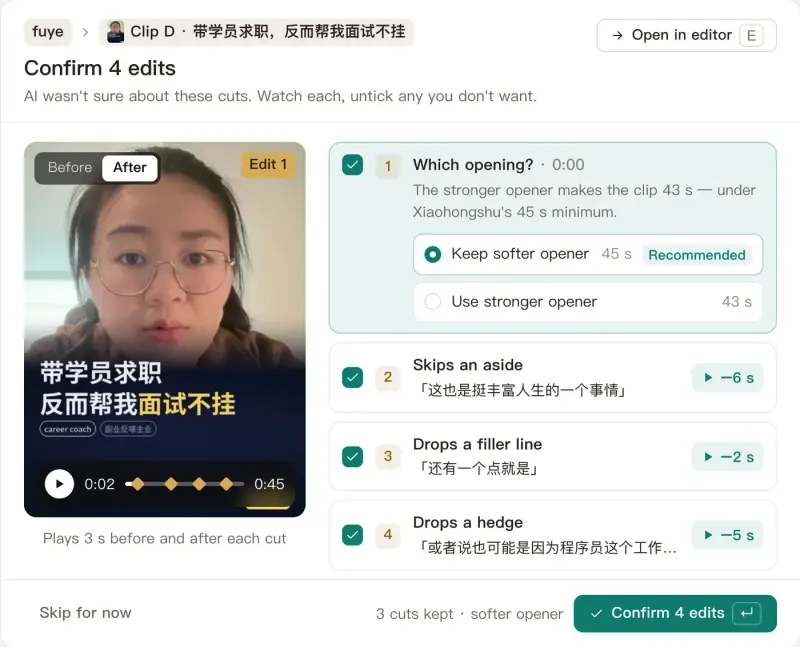
Check the plan
See which answers were picked and which parts of the screen are masked.
Render and check
Clips render locally; automatic checks flag captions, loudness and length problems.
Ask, then publish
Share the clips with your guest before they go out. You press publish on each platform.
Questions
Questions, answered plainly.
Which meeting apps work?
Any recording you have as a video file, including Zoom, Google Meet and Microsoft Teams recordings.
Does the masking follow the face?
Masks are placed per clip on the guest’s tile. Check the flagged clips in review before publishing, especially when the layout changes mid-call.
Do recordings leave my Mac?
Video and audio stay on your Mac. The transcript text goes to the AI you choose for planning, or nowhere if you use a local model.
Related
Clip your next interview, privately.
Free and open source. Your video stays on your Mac.
macOS app coming soon · MIT licensed · works today as a Claude Code skill