

Talking-head shorts
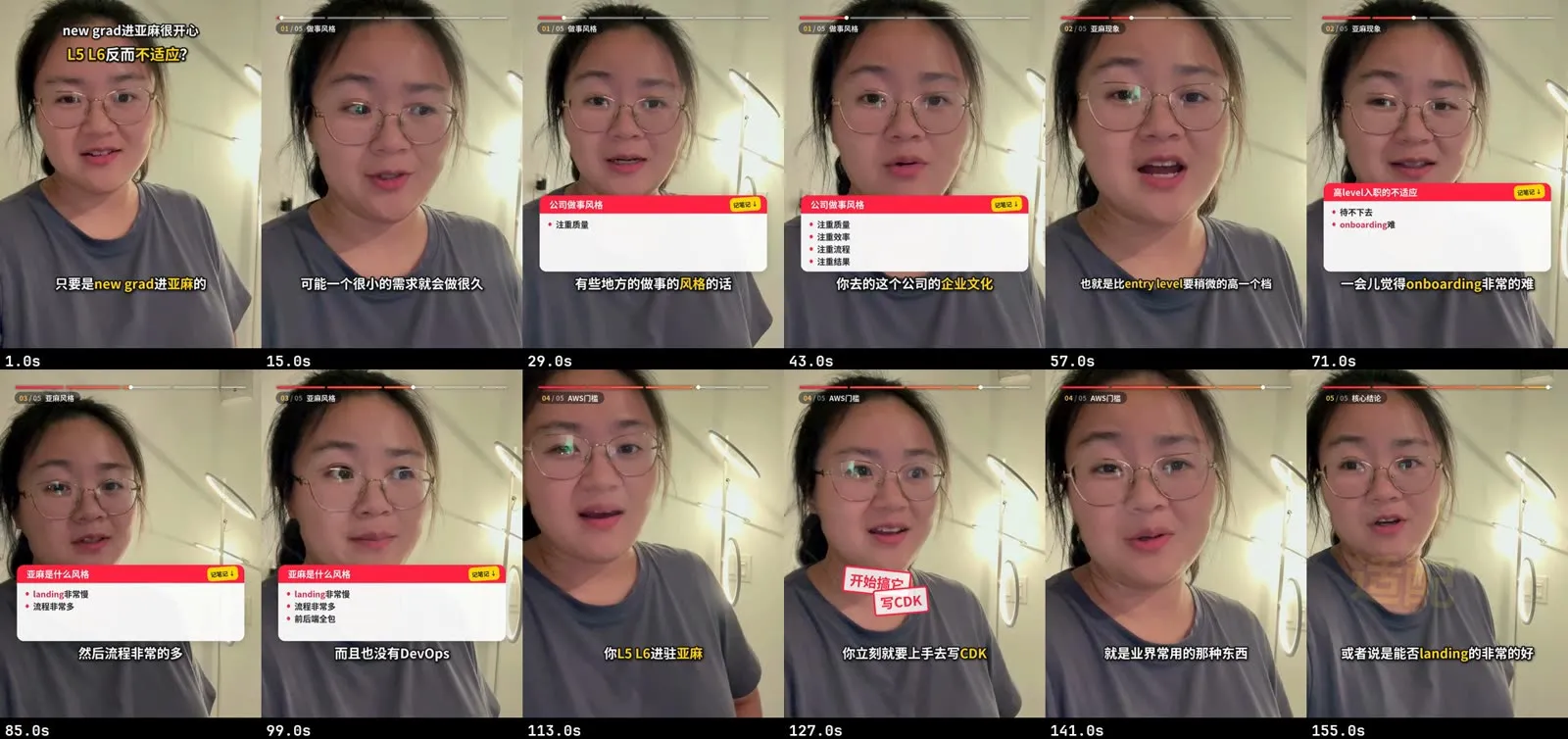
You get a short, tight talking-head video: pauses squeezed, fillers and repeats cut, sped up a little, captioned, with a cold-open hook, notes panels or keyword pops, a progress bar, a retouched face, a cover and the post copy.
Before you start
Section titled “Before you start”- Your clips. One or more vertical phone clips (iPhone HDR is fine), or a horizontal webcam or camera recording. A horizontal export that already has burned subtitles also works, with fewer styles.
- A few domain terms you say often (product names, English words in Chinese speech). They help the transcript get them right.
- Optional B-roll: screen recordings, screenshots or short clips you want to cut to while you keep talking.
In the Mac app
Section titled “In the Mac app”- On Home, describe the video in the request box and add your clips. Say which platform it’s for and which style you want, if you know.
- Reelfold shows a plan: the talking-head recipe, the platforms, the speed and the editing style. Change anything in plain words before you start.
- The batch runs on your Mac: transcription, cleanup, retouch, captions, layout, export.
- Review comes to your Inbox only where you’re needed:
- Pick the hook. A ranked list of candidate sentences for the cold open, or none.
- Confirm filler cuts. Obvious hesitations and stutters are already gone. Words that might be real (那个, 就是, “like”, a restart, a re-take) wait for your yes. You can answer by type in one go.
- Pick the cover frame and its text.
- Approve the export. Each platform gets its own file, cover and post copy, and Publish opens the platform’s upload page for you to press publish.
With the Claude Code skill
Section titled “With the Claude Code skill”Hand Claude the folder and say what you want. The skill follows workflows/talkinghead:
- It scans the transcript and shows about 12 numbered hook candidates, each tagged (核心观点, 反差, 金句, 悬念…), and suggests a few combos. You pick the set and the order.
- It runs the shared speech cleanup and shows you a review sheet. You answer in one line, for example
确认 3,5,9 / 保留 7, and it re-transcribes the cut to make sure no real word was lost. - It asks which style you want, then renders preview stills before the full render.
The same cleanup is available on its own for any recording:
python -m vstudio.cleanup analyze talk.mp4 --profile standardpython -m vstudio.cleanup apply cleanup.json --reply "确认 3,5,9 / 保留 7"python -m vstudio.cleanup verify talk.clean.<tag>.mp4Styles
Section titled “Styles”| Style | What it looks like |
|---|---|
| 记笔记 (notes) | Classic progress bar, callouts, 记笔记 notes panels for the key points, hook badge. Calm and screenshot-friendly. |
| 精剪 (refined) | Zoom rhythm, keyword pops, red stamps, circle and card scenes, sound effects, a refined progress bar. Fast and punchy. |
| 混合 (mixed) | The refined rhythm plus notes panels for the two or three points worth saving. |
Switching style later costs one re-render.
Vertical phone clips vs a horizontal webcam
Section titled “Vertical phone clips vs a horizontal webcam”- Vertical phone clips go straight onto the 9:16 canvas (HDR is converted first).
- A horizontal webcam or camera recording is reframed to 9:16 by following your face: a smoothed virtual camera with a dead zone, eased pans, and your eye line kept about a third down inside the platform’s safe area. With no face found, it falls back to a blurred fill. Punch-ins are capped so an upscaled crop doesn’t get soft. You can also keep it 16:9 for YouTube or B站 and get the landscape layout, where panels and callouts sit on the side away from your face.
Options worth knowing
Section titled “Options worth knowing”| Option | Default | What it does |
|---|---|---|
| Engine | fast | In the app, fast cleans and captions; the full style engine adds the styles, face tracking, panels and progress bar. |
| Body speed | 1.1× | Pitch is kept. Chinese stays intelligible up to about 1.4×. |
| Hook speed | 1.3× | The cold-open montage plays a bit faster than the body. |
| Cleanup strength | standard | gentle, standard or tight: how hard pauses are squeezed. Pauses are shortened, never deleted. |
| Style | mixed | notes, refined or mixed (above). |
| Highlighted keywords | none | Words drawn in the highlight colour in captions. |
| Retouch | natural makeup, low strength | Slim, eyes, de-shine, skin smoothing, light makeup. Makeup can be turned off. |
| B-roll | none | cut (full cut-away), pip (corner card) or split (top/bottom). Tall screenshots scroll or get highlighted rows. Your voice keeps playing. |
| Platforms | 小红书 9:16 | Also 小红书 3:4, 抖音, TikTok, Shorts, YouTube, B站. |
Example prompts
Section titled “Example prompts”- “Edit these three iPhone clips into a Xiaohongshu short. Notes style, cut the pauses and filler words, add a hook up front and a cover.”
- “This is a webcam recording. Make a vertical version for TikTok and Shorts and keep a 16:9 one for YouTube.”
- “Use the refined style, speed it up a bit more, and cut to my screen recording when I talk about the dashboard.”
- “Swap the hook for the line about onboarding and make the cover text shorter.”